
Catalog management software: maintain and approve supplier catalogs centrally
In Catalog Management, procurement imports supplier catalogs, reviews them and approves them for the Catalog Shop. Punchout catalogs, SmartForms, units of measure and classifications are configured here.
The module is procurement's workspace in the Ovenca eProcurement software. Only what has been approved here can be ordered.
Procurement's workspace for catalogs
In Catalog Management, procurement decides which suppliers, catalogs and items can be ordered in the company. Catalogs enter the system as a file, through the Vendor Portal or as a punchout connection. They pass validation and approval before requesters see them in the Catalog Shop.
- Users
- Catalog managers and operational buyers
- Objects
- Vendors, catalogs, products, bundle items, categories and SmartForms
- Import formats
- CSV, Excel and BMEcat
- Catalog size
- Catalogs with more than 5 million items in total
- Result
- Approved catalogs that can be searched and ordered in the Catalog Shop
From supplier catalog to orderable assortment
Every catalog has a status. The catalog list shows where a catalog stands in the process.
Import
Procurement loads the catalog file as CSV, Excel or BMEcat, or the supplier submits it through the Vendor Portal.
Validation
Catalog data is checked during import. Failed imports are marked as such in the list.
Approval
The catalog passes the approval levels, in the example Controlling and Procurement. Approvers can request changes or reject.
Provision
Approved catalogs are indexed and are then available in the Catalog Shop.

The screenshots on this page show a demo environment with sample data.
- Catalog statusNew, data import pending, approval pending, changes requested, approved or rejected.
- Index statusShows whether a catalog is being indexed or is ready for search.
- Config approvalPunchout catalogs have a separate approval of their configuration, in the example with technical and non-technical levels.
- Vendor and catalogEvery catalog belongs to a vendor. The list can be filtered by status, vendor and catalog name.
- ExportThe catalog list can be exported.
AI and automation in catalog management
Ovenca has an AI assistant and an MCP server. Both know every function of the application, including those of Catalog Management. Whatever happens with every catalog runs automatically anyway.
AI assistant and MCP server
In the AI assistant, buyers describe what they need in their own words. The assistant uses the same functions as the user interface: find catalogs, check status, handle approvals, maintain items and mappings.
Through the MCP server (Model Context Protocol), other AI applications that support MCP can use these functions too. External systems are excluded, such as the supplier shops behind a punchout catalog.
Example requests
- Which catalogs are waiting for my approval?
- Show me the items with errors in the last import.
- Map the supplier unit “pcs” to the SAP unit of measure “PC”.
- Which catalogs from this supplier are approved?
What runs automatically
- Validation on import
- Catalog data is validated on import. Failed imports are flagged in the catalog list.
- Corrections by the supplier
- Suppliers get a list of issues per item and correct them in the Vendor Portal themselves. Procurement receives validated catalogs for approval.
- Units and classification
- Mappings to SAP units of measure and to the UNSPSC classification are maintained once instead of adjusting every catalog by hand.
- Approval routing
- Catalogs pass through the approval stages; routing can follow the commodity group.
- Provisioning
- Approved catalogs are indexed and then available for search in the Catalog Shop.
Configuring punchout catalogs
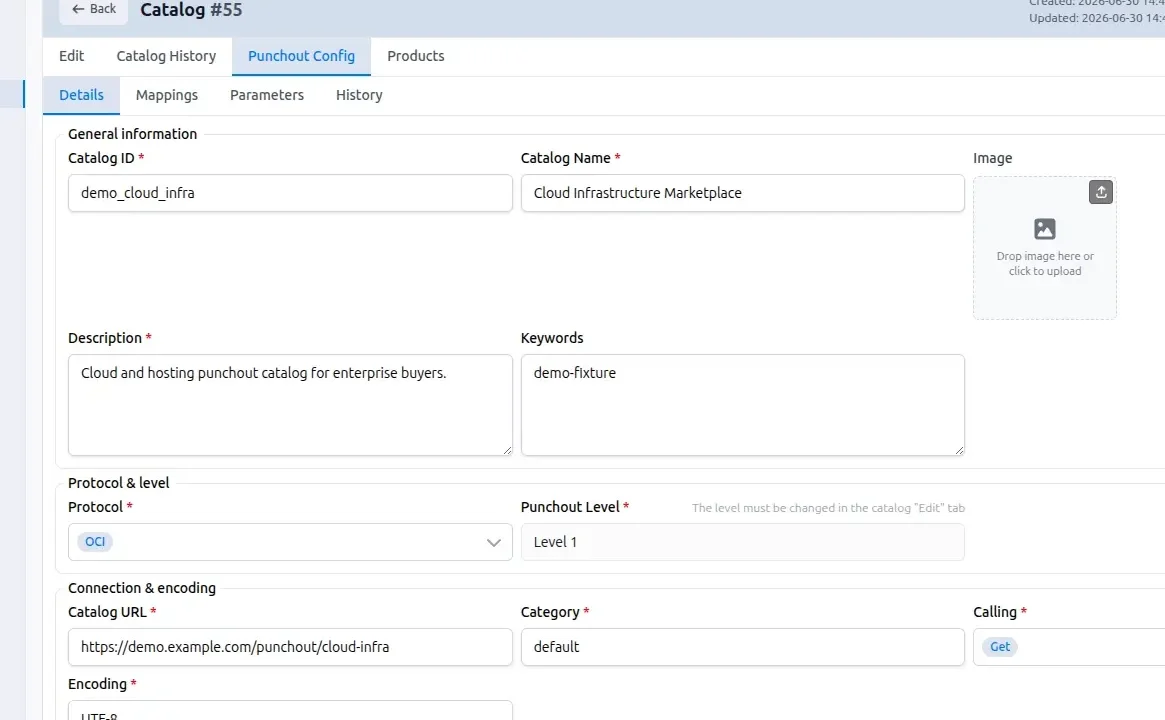
Supplier shops are set up as punchout catalogs. The connection is maintained per catalog in Catalog Management and approved before use. With punchout level 2, the supplier's items are additionally imported like catalog items; the file only carries a few extra columns for this. The items appear in search, and the jump leads straight to the product page in the supplier's shop instead of its start page.

- Protocol and levelSelection of the protocol, OCI in the example, and display of the punchout level
- ConnectionCatalog URL, calling method and character encoding
- ParametersSeparate tab for the connection parameters
- MappingSeparate tab for the field mappings
- TestThe configuration can be tested from within the screen
- HistorySeparate history tabs for the catalog and for the punchout configuration
What is a PunchOut catalog? Process and cXML vs. OCI compared
SmartForms for items that need additional details
Some items need more than quantity and price. The example is a business card with name, position, department and contact details. Procurement builds forms for such items and assigns them to products.

- Field typesHeadline, description, text field, text area, radio button, checkbox, dropdown, date, e-mail field and number field.
- WorkspaceDrag fields into the workspace, reorder, duplicate and remove them.
- PropertiesPer field: required flag, message text, placeholder, maximum length and price.
- Preview and productsSeparate tabs for the form preview and the assigned products.
Mapping units of measure and classification
Suppliers deliver units and classifications in their own logic. The configuration area holds the mappings that make catalog data and carts fit your ERP.

- Units of measure
- Maintenance of the units of measure used in catalogs
- SAP units of measure
- Mapping to the units of measure in SAP
- Currencies
- Maintenance of the currencies in use
- OCI Cart Mapping
- Mapping of the cart fields for the handover via OCI
- UNSPSC Mapping
- Mapping of the UNSPSC classification
Control over assortment and data quality
Catalog Management is where procurement takes responsibility for the assortment.
Approval before visibility
A catalog can only be ordered from after approval. Approvals have several levels, and routing can follow the material group.
Permissions down to the relation
Roles govern read, create, update and delete per object and per relation between objects.
Assignment to the organisation
Catalogs are linked to legal entities, plants and procurement managers.
Queries to suppliers
Approvers comment on the item. The supplier corrects it in the Vendor Portal and submits the catalog again.
History
Every catalog has a history in which transactions remain traceable.
Roles and approvals in the Admin AreaeProcurement savings calculator
Interfaces of Catalog Management
Catalog data comes from files, from suppliers and from supplier shops. Master data comes from the ERP.
- File import
- CSV, Excel and BMEcat
- Suppliers
- Submission and maintenance through the Vendor Portal
- Punchout
- Connection of supplier shops via OCI or cXML
- ERP
- Contracts, material numbers and master data from SAP, Microsoft Dynamics, Oracle, Infor, Sage, DATEV or proprietary systems
- Catalog Shop
- Approved catalogs are available to authorised users in the shop
Catalog Management capabilities
The table summarises the functions for catalog managers.
| Area | Function | Scope |
|---|---|---|
| Import | File formats | CSV, Excel, BMEcat |
| Import | Submission by suppliers | Through the Vendor Portal |
| Review | Validation | Check of the catalog data during import |
| Review | Approval | Multi-level, with change request and rejection |
| Provision | Indexing | Index status per catalog |
| Punchout | Configuration | Protocol, level, URL, calling method, encoding, parameters, mapping, test |
| Punchout | Punchout level 2 | Items via catalog import with extra columns, findable in search, jump to the product page in the supplier shop |
| Punchout | Config approval | Separate approval levels for punchout catalogs |
| SmartForms | Form editor | Field types, required fields, preview, assignment to products |
| Master data | Units and currencies | Units of measure, SAP units of measure, currencies |
| Master data | Classification | Categories, UNSPSC Mapping |
| Control | History | Per catalog and per punchout configuration |
| AI | AI assistant | All application functions in your own words, excluding external systems such as punchout shops |
| AI | MCP server | Access for AI applications that support the Model Context Protocol |
Frequently asked questions about catalog management
Request a demo or a technical discussion
Tell us briefly about your system landscape and what prompted your enquiry. Your contact is Jens Bohl.