
Supplier portal software: your own Vendor Portal for suppliers and catalogs
In the Vendor Portal, your suppliers maintain items, prices, images and documents themselves. Your procurement team reviews, comments and approves.
The portal is a module of the Ovenca eProcurement software and runs in your instance. It is not a supplier network: suppliers pay no network fees.
A portal you operate for your suppliers
The Vendor Portal is supplier portal software for the buying side. You provide it to your suppliers, and every supplier receives their own access. Maintaining the catalog data is the supplier's task, the decision on approval rests with your procurement team.
This replaces the exchange of catalog files by e-mail. Review, queries and approval take place in one location and remain traceable.
Ovenca validates every catalog on submission and shows the supplier, item by item, what is missing or wrong. The supplier corrects the data or uploads the catalog again. Your procurement team only receives validated catalogs for approval and does not have to find or report errors itself.
- Users
- Suppliers for maintenance, procurement for review and approval
- Operation
- Part of your Ovenca instance, On-Premise or in the Private Cloud
- Cost for suppliers
- No network fees
- What it is not
- Not a public supplier directory and not a marketplace
- Result
- Reviewed catalogs that can be ordered from in the Catalog Shop after approval
How a catalog moves through the portal
Four steps from upload to approval, shown on the screens suppliers work with.
Upload the catalog
The supplier uploads the catalog as a CSV file or as a ZIP archive containing CSV files. A wizard leads through four steps: catalog, images, documents and approval.
- Images and documents have their own steps in the wizard.
- A file with the same name replaces the items of the earlier file.
- New items are validated after submission.

The screenshots on this page show a demo environment with sample data.
Resolve issues per item
Validation shows an issue list for every item. In the example, the mandatory product name is empty, the image is missing and the stated material group does not exist.
- Filter for entries with issues
- Create, edit, view and delete items in the portal
- Correction in the portal or by uploading the CSV again

Clarify the approver's queries
If the approver declines a catalog, the supplier sees the reason and the comments on the affected items. The supplier corrects the entries and submits the catalog again.
- Reason for the decline at the top of the screen
- Comments per item with a counter
- Images and attachments can be added in the same screen

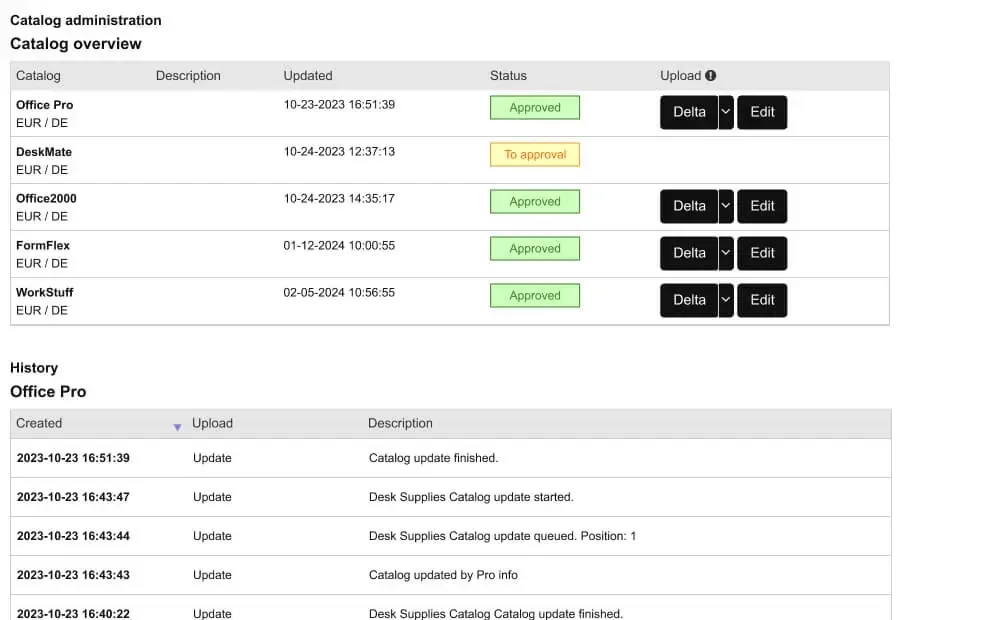
View status and history
The catalog overview shows the status of every catalog, in the example “To approval” and “Approved”. Below it is the history of each catalog with timestamps.
- Status per catalog with the date of the last change
- Delta upload and editing for approved catalogs
- History with time, type and description of the transaction

What procurement controls
The supplier maintains, procurement decides. The portal records who submitted and approved what.
Approval by procurement
No catalog can be ordered from without approval. Approvals can have several levels, and routing can follow the material group.
Comments on the item
Approvers give a reason for declining and comment on individual items. The supplier sees the comments where the correction is made.
Freely configurable questionnaires
In addition to catalog data, you can request information from your suppliers. You define which questions a questionnaire contains.
Status and history
Every catalog has a status and a history with timestamps. Transactions are recorded in the audit trail.
No network fees
Ovenca is software in your operation, not a supplier network. Your suppliers pay no network fees.
How the portal fits into the platform
The Vendor Portal is the entry point for catalog data from suppliers. The other modules take over from there.
- Upload in the portal
- CSV files and ZIP archives containing CSV files
- Import by procurement
- CSV, Excel and BMEcat in Catalog Management
- Suppliers with their own shop
- Connected as a punchout catalog via OCI or cXML
- Catalog Shop
- Approved catalogs are available to requesters in the shop
- ERP
- Purchase requisitions and orders are handed over to SAP, Microsoft Dynamics, Oracle, Infor, Sage, DATEV or proprietary systems
Vendor Portal capabilities
The table summarises the functions for suppliers and approvers.
| Area | Function | Scope |
|---|---|---|
| Catalog maintenance | Upload | CSV or ZIP containing CSV files, wizard in four steps |
| Catalog maintenance | Editing in the portal | Create, edit, view and delete items |
| Catalog maintenance | Delta upload | For existing catalogs |
| Catalog maintenance | Punchout level 2 | Items of the supplier's own shop via catalog import, findable in the procurement portal |
| Media | Images and documents | Separate steps in the wizard, later addition of images and attachments |
| Review | Validation | Issue list per item, filter for entries with issues |
| Review | Correction by the supplier | Fix errors in the portal or upload the catalog again, without involving procurement |
| Approval | Comments | Reason for declining and comments per item |
| Approval | Status | Status per catalog |
| Evidence | History | Transactions per catalog with timestamps |
| Supplier information | Questionnaires | Freely configurable |
| Cost | Network fees | None for suppliers |
Frequently asked questions about supplier portal software
Request a demo or a technical discussion
Tell us briefly about your system landscape and what prompted your enquiry. Your contact is Jens Bohl.