
eProcurement administration: roles, permissions and approvals in the Admin Area
In the Admin Area, IT and procurement management define who may see and do what in Ovenca: roles and permissions, legal entities and plants, visibility and approval paths.
The Admin Area is the control module of the Ovenca eProcurement software. This is where the rules are set that govern catalog visibility and approvals.
The control module of the platform
Corporate groups and large mid-sized companies procure across many legal entities, plants and business units. The Admin Area maps this structure and ties permissions, visibility and approvals to it.
It remains traceable who sees which catalog, who may change data and who approves.
- Users
- System administration and procurement management
- Areas
- Roles, users, legal entities and plants
- Permission model
- Read, create, update and delete per entity and per relation
- Approvals
- Multi-level, routing by material group possible
- Sign-in
- SSO via SAML 2.0 or OIDC, MFA via TOTP
Roles and permissions down to entity and relation
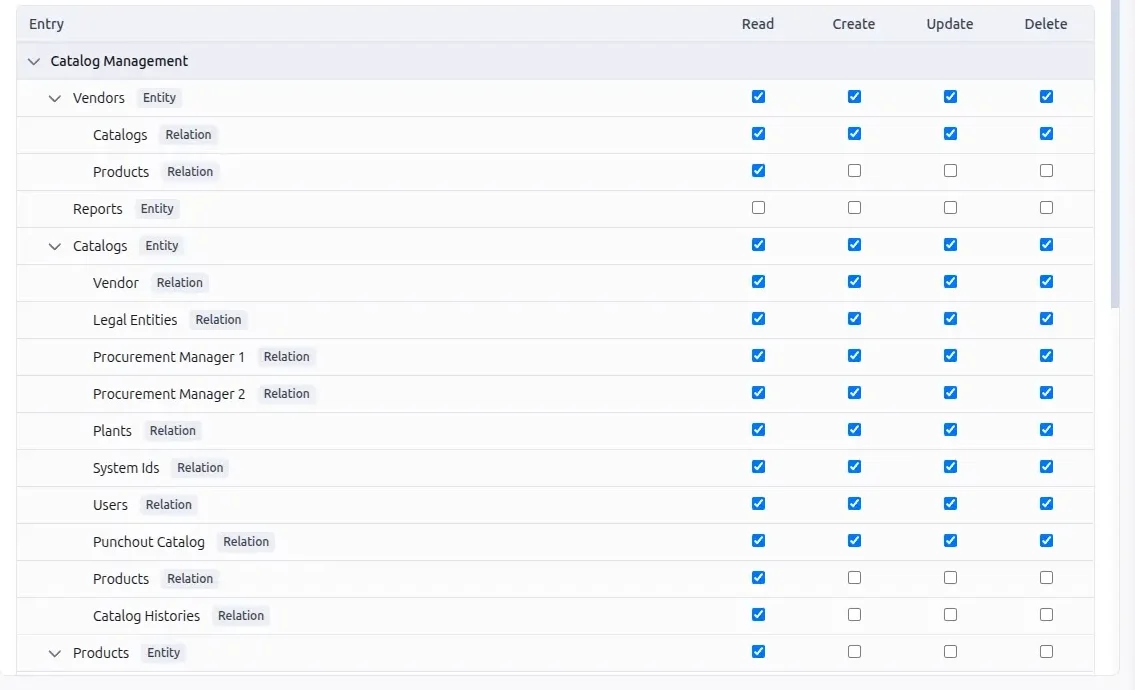
A role defines for every object whether it may be read, created, updated or deleted. The same decision can be made for the relations between objects.

The screenshots on this page show a demo environment with sample data.
- Four permissions per rowRead, create, update and delete are granted individually.
- EntitiesVendors, catalogs, products and reports are separate entities with their own permissions.
- RelationsBelow each entity are its relations, for catalogs for example to legal entities, plants, users and punchout catalogs.
- Graded permissionsIn the example, the role may fully edit catalogs but only read the related products.
- AdministrationRoles, users, legal entities and plants have their own areas.
Legal entities, plants and visibility
The organisational structure is maintained in the Admin Area. Catalogs are assigned to it, and visibility follows from that.

- Legal entities
- The company's legal entities are managed as separate objects.
- Plants
- Sites are created as plants.
- Users
- Users are managed in the Admin Area and receive roles.
- Visibility
- Catalogs are linked to legal entities, plants and users. This determines who sees which catalog.
- Procurement managers
- Procurement managers can be assigned per catalog.
Multi-level approvals
Approvals run across several levels. Which function approves can depend on the material group. The catalog list shows which level a transaction has reached.

- Levels
- In the example, catalogs pass the levels Controlling and Procurement.
- Punchout
- The configuration of punchout catalogs has its own levels, technical and non-technical in the example.
- Outcomes
- Approved, changes requested or rejected.
- Routing
- Approvers can be assigned by material group.
Traceability, reporting and access
For audit, IT security and data protection, what matters is what is recorded and how access is governed.
- Audit trail
- Transactions are recorded. Catalogs and punchout configurations have their own history.
- Reporting
- Reports are available in the Admin Area. Access to reports is a separate permission in the role, and lists can be exported.
- Single sign-on
- SAML 2.0 or OIDC
- Multi-factor
- MFA via TOTP
- Encryption
- TLS for transmission
- Data protection
- GDPR, data processing agreement
- Operation
- On-Premise or Private Cloud as a separate instance in a data centre in the EU
Admin Area capabilities
The table summarises the control functions.
| Area | Function | Scope |
|---|---|---|
| Access | Roles | Permissions read, create, update and delete |
| Access | Granularity | Per entity and per relation |
| Access | Users | User management with roles |
| Organisation | Legal entities | Legal entities as separate objects |
| Organisation | Plants | Sites as separate objects |
| Organisation | Visibility | Catalogs per legal entity, plant and user |
| Approvals | Levels | Multi-level |
| Approvals | Routing | By material group possible |
| Evidence | Audit trail | Record of transactions, history per catalog |
| Evidence | Reporting | Reports and export |
| Sign-in | Single sign-on | SAML 2.0, OIDC |
| Sign-in | Multi-factor | TOTP |
Request a demo or a technical discussion
Tell us briefly about your system landscape and what prompted your enquiry. Your contact is Jens Bohl.