
Internal procurement shop: the Catalog Shop of the Ovenca platform
In the Catalog Shop, requesters from the business units search across all approved catalogs, compare items and add them to the cart. After approval, the purchase requisition goes to your ERP.
Procurement defines which catalogs a user sees through roles, legal entities and plants.
The ordering interface for the business units
Employees in business units, plants and legal entities use the Catalog Shop to request indirect goods such as office and IT supplies, laboratory supplies, protective equipment, tools or packaging. It works the way users know from online shops. The assortment, however, is controlled: the shop only shows catalogs that procurement has reviewed and approved.
Catalogs are imported and approved in Catalog Management, suppliers maintain their data in the Vendor Portal, and permissions and visibility come from the Admin Area.
- Users
- Requesters in business units, plants and legal entities
- Content
- Approved catalogs and connected punchout catalogs
- Catalog size
- Catalogs with more than 5 million items in total
- Result
- A cart that is handed over to the ERP as a purchase requisition after approval
- In production
- In use worldwide at LANXESS AG, working together since 2014, with SAP contracts and material numbers in the product search
One search across all approved catalogs
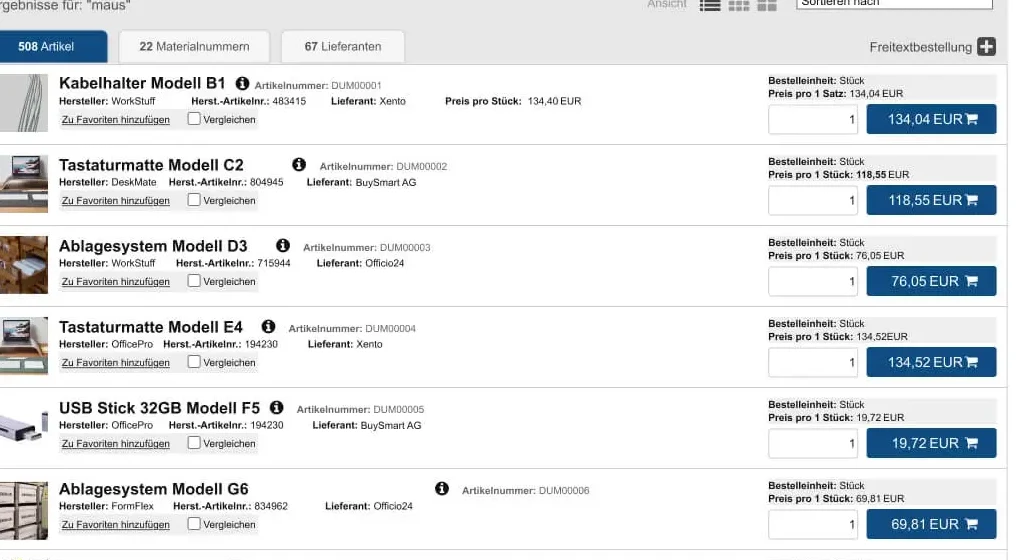
A single query searches the catalogs of all suppliers at once. The result list shows what a requester needs to decide: item, manufacturer, supplier, order unit and price. Search stays fast even with several million items. Items from punchout catalogs with level 2 appear in the same result list and lead straight to the product page in the supplier's shop.

The screenshots on this page show a demo environment with sample data.
- Search fieldSelection of the search scope and an advanced search.
- Results in three viewsThe same query returns items, material numbers and suppliers on separate tabs.
- FiltersNarrow down by manufacturer, supplier and category. External catalogs have their own section.
- ComparisonMark items in the result list and put them side by side in a comparison list.
- Favourites and cartsSave items as favourites, store carts and open them again.
- Price and order unitEvery result shows order unit and price. The quantity is entered directly in the list.
- Free-text orderIf the requirement is not in any catalog, a free-text item is created from here.
Free-text orders with catalog suggestions
Not every requirement is in a catalog. The free-text order captures it in fixed fields and shows whether a matching catalog item exists.
Structured free-text item
Short text, supplier description, material group, purchasing group, quantity, price, required date and order text are separate fields. The purchasing group can only be selected once the material group is set.

Suggestions from the catalog
For the short text entered, the shop shows recommendations from the catalogs. In the example, “Mauspad” leads to 37 catalog items. Before submitting, the requester sees whether the requirement is already covered by a catalog.

A legend in the shop explains the field states: fields marked green are filled in correctly, fields marked red must be corrected before the data can be transferred.
Controlled procurement instead of open buying
For requesters the shop is simple to use. The rules behind it are set by procurement.
Approved assortment
Catalogs only appear in the shop after they have been validated and approved in Catalog Management.
Visibility by organisation
Roles, legal entities and plants determine which catalogs a user sees.
Approvals before the order
Approvals can have several levels. Routing to the approvers can follow the material group.
Free text as a regulated exception
Free-text items are captured with material group and purchasing group. The catalog suggestions show in advance whether an approved item exists.
Traceability
Transactions are recorded in the audit trail.
Connection to ERP and supplier shops
The Catalog Shop runs next to your ERP. Orders, contracts and master data remain leading there.
- Punchout catalogs
- Supplier shops are connected via OCI or cXML. The requester switches to the supplier's shop and the cart comes back.
- Handover to the ERP
- Purchase requisitions and orders are handed over to the ERP. Interfaces: OCI, cXML and API.
- Data from the ERP
- Contracts, material numbers and master data come from the ERP. At LANXESS AG, SAP contracts and material numbers are part of the product search.
- ERP systems
- SAP, Microsoft Dynamics, Oracle, Infor, Sage, DATEV and proprietary systems
- Sign-in
- Single sign-on via SAML 2.0 or OIDC
Catalog Shop capabilities
The table summarises what requesters can do in the shop and what procurement controls.
| Area | Function | Scope |
|---|---|---|
| Search | Cross-catalog search | One query across all approved catalogs, plus an advanced search |
| Search | Large data volumes | Fast search even with several million items |
| Search | Punchout level 2 | Items from external shops in the result list, jump straight to the product page |
| Search | Results in three views | Items, material numbers and suppliers on separate tabs |
| Search | Filters and view | Manufacturer, supplier, category; sorting; list and tile view |
| Selection | Item comparison | Comparison list from the result list |
| Selection | Favourites | Save items and open them again |
| Selection | Saved carts | Store carts and reuse them |
| Special requirements | Free-text order | Fixed fields with material group and purchasing group, catalog suggestions while entering |
| Special requirements | SmartForms | Forms for items that need additional details, configured in Catalog Management |
| External catalogs | Punchout | OCI and cXML |
| Control | Visibility | By role, legal entity and plant |
| Control | Approvals | Multi-level, routing by material group possible |
| Integration | Handover to the ERP | OCI, cXML, API |
Frequently asked questions about the Catalog Shop
Request a demo or a technical discussion
Tell us briefly about your system landscape and what prompted your enquiry. Your contact is Jens Bohl.